
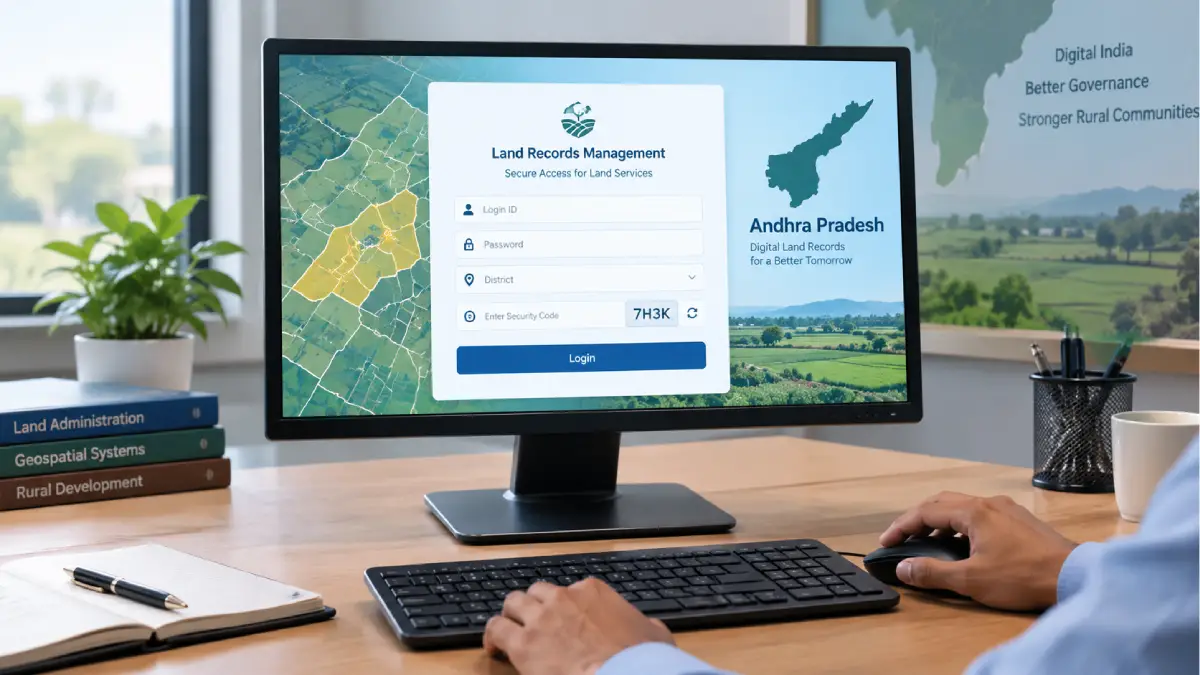
If you are searching for webland2 polr 6 login, you are probably trying to access the Andhra Pradesh Webland system or understand a POLR6 login page. The terminology can be confusing because Webland, POLR and public land-record services are related but are not necessarily the same thing.
Webland 2.0 is associated with Andhra Pradesh’s integrated land-record management system. Government material describes Webland as a land-record system used within the state’s Revenue Department, while POLR6 appears in departmental workflows for authorised users.
This guide explains what the Webland2 POLR6 login means, who may use it, what information is normally required and what to do if you cannot sign in.
Table of Contents
What Is Webland2 POLR 6?
Webland 2.0 is an Andhra Pradesh land-record management system used to handle and process information relating to land parcels and revenue records.
The system forms part of the state’s wider digital land-record infrastructure. Government documentation describes Webland 2.0 as an integrated land-record management system based around land-parcel records.
The term POLR6 appears in Andhra Pradesh Revenue Department documentation and user manuals. It is not simply another name for a general-purpose consumer website.
A government user manual, for example, describes Tahsildar, RDO/Sub-Collector and Joint Collector users entering their credentials and district selection to access the POLR6 portal.
This distinction matters because some third-party pages describe Webland as though anyone can simply create an account and access all land records. That should not be assumed without official confirmation.
What Does POLR Mean?
POLR commonly refers to Purification of Land Records in the Andhra Pradesh land-record modernisation context.
The Andhra Pradesh revenue process has used POLR activities to verify and improve land-record information before further stages of land resurvey and record processing.
Government documentation describes POLR activities involving verification of existing records, data entry, checking land information and processing records through different administrative levels.
Therefore, when someone searches for Webland2 POLR 6 login, the search is more closely connected with a departmental land-record workflow than with an ordinary social-media-style account login.
Who Can Access the POLR6 Portal?
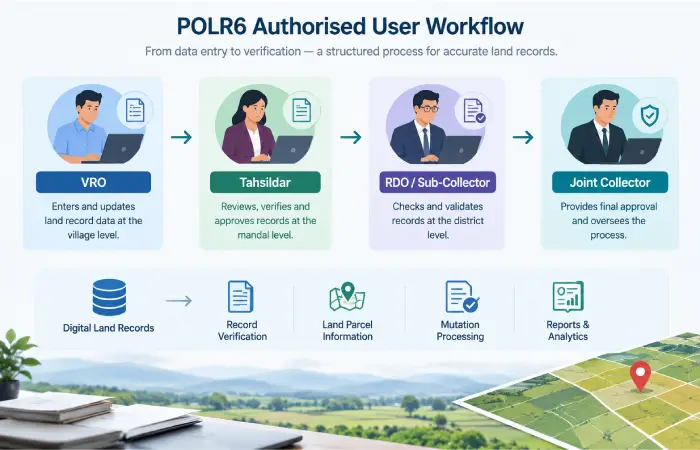
POLR6 access is role-based.
Government documentation provides examples of departmental users accessing the portal with their credentials. These include:
- Village-level Revenue personnel
- Tahsildars/MROs
- RDOs or Sub-Collectors
- Joint Collectors
- Other authorised departmental users
The precise access available after login depends on the user’s role and permissions. A VRO, MRO/Tahsildar and RDO do not necessarily see identical screens or have identical functions. Government manuals describe different workflows for these roles.
This is one of the most important points to understand before attempting to register.
If you are a member of the public looking for your own land records, do not assume that POLR6 is the correct citizen-facing service.
How to Complete the Webland2 POLR 6 Login
The exact interface can change as government systems are updated. However, official documentation gives a useful indication of the basic login process.
Step 1 — Open the Official Webland Route
Start from an official Andhra Pradesh government land-record resource rather than an unfamiliar website.
The Andhra Pradesh government’s Bhuseva platform identifies itself as being published and managed by the Office of the Chief Commissioner of Land Administration and includes Webland-related information.
If you have been given a specific departmental login address by your office, use that approved address.
Step 2 — Enter Your Login ID
The POLR6 login process described in government documentation requires a user name or login ID.
Enter the credentials issued to you by the appropriate department or administrator.
Do not use another person’s credentials.
Step 3 — Enter Your Password
Enter your authorised password in the password field.
Avoid saving departmental credentials on shared computers. If you are working on a public or shared machine, make sure your password is not stored by the browser.
Step 4 — Select the District
Government POLR6 documentation specifically describes selecting the district from a dropdown before logging in.
Choose the district associated with your authorised account.
If the expected district is missing, do not repeatedly try unrelated districts. The problem may be related to your account configuration or the current portal setup.
Step 5 — Complete the Login
After entering the required details, select the Login button.
If the credentials and account permissions are correct, you should be taken to the relevant departmental dashboard or module.
The available options depend on your role.
What Can Authorised Users Do After Login?
POLR6 is connected with administrative land-record workflows rather than being a single-purpose public search page.
Government documentation shows that different users can perform different tasks.
For example, VRO users may work with assigned-land records and data-entry activities, while higher-level users can review, digitally sign, verify or forward records as part of the relevant workflow.
Other Webland-related processes can involve:
- Land-record data management
- Record verification
- Mutation-related processing
- Land-parcel information
- Record-of-Rights processes
- Resurvey activities
- Administrative reports
- Digital verification and approval
The exact functions available to an individual account should always be determined by the current system and the user’s official role.
Webland2 vs MeeBhoomi: Are They the Same?
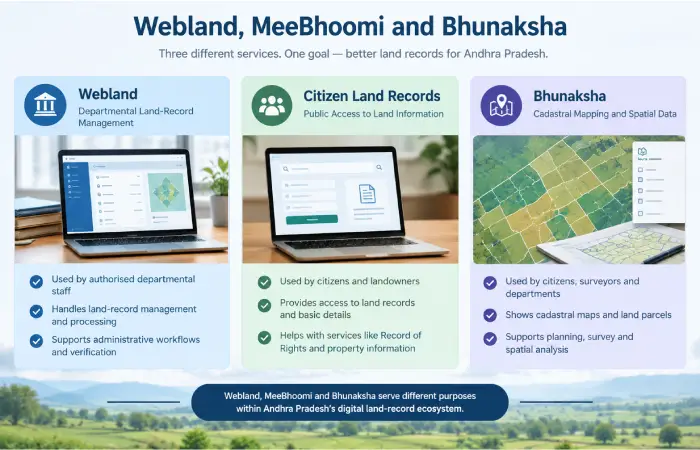
No. They should not automatically be treated as the same service.
Webland 2.0
Webland is associated with the Andhra Pradesh government’s land-record management infrastructure and departmental processes. It supports administrative handling of land-record information.
MeeBhoomi
MeeBhoomi is associated with access to Andhra Pradesh land-record information for citizens.
The Department of Land Resources maintains state-wise information about land-record portals and identifies Andhra Pradesh as having an online Record of Rights resource.
Bhunaksha
Bhunaksha AP is focused on cadastral mapping and land maps. The official Andhra Pradesh site describes it as cadastral mapping software for the state and explains its integration with land-record systems.
A simple way to think about them is:
| Resource | Main purpose |
| Webland 2.0 | Land-record management and departmental workflows |
| POLR6 | A departmental portal/workflow associated with POLR |
| MeeBhoomi | Citizen-facing land-record information |
| Bhunaksha | Cadastral maps and spatial land information |
Common Webland2 POLR 6 Login Problems
If the webland2 polr 6 login does not work, avoid assuming that the entire system is unavailable.
Incorrect username or password
Check that you are using the credentials assigned to your account.
Make sure Caps Lock is not enabled and avoid copying extra spaces into the login fields.
Incorrect district
If the portal asks you to select a district, confirm that you have selected the district associated with your account.
Captcha or security-code problem
If a captcha is displayed, enter the current value exactly as shown.
Refresh it if the characters are difficult to read.
Account permission issue
A valid username and password do not necessarily provide access to every module.
POLR6 uses role-based workflows, so an account may be authorised for certain functions but not others.
Temporary technical problem
Government portals can occasionally experience maintenance, connectivity or server-side issues.
Try again later and check whether the official portal or department has published an outage or maintenance notice.
Browser problem
If the page behaves unexpectedly:
- Refresh the page.
- Try a current browser.
- Clear cached website data if appropriate.
- Try a private/incognito window.
- Check your internet connection.
- Avoid repeatedly submitting incorrect credentials.
If the problem continues, contact the relevant departmental administrator rather than relying on an unofficial login service.
Is POLR6 Available to Everyone?
Not necessarily.
This is an important distinction that is missing from many third-party articles.
Government documentation explicitly describes POLR6 login through departmental credentials and identifies different administrative roles using the system.
Therefore, you should not assume that a member of the public can simply click a registration button, create an account and obtain access to the same POLR6 functions.
If you are a citizen trying to find information about your own property, start with the appropriate official citizen-facing land-record service instead.
How to Stay Safe When Using the Login Portal
Land records can contain sensitive property and personal information, so basic account-security practices are worthwhile.
Use the official website
Check the domain carefully before entering credentials.
Do not trust a website simply because it contains the words “Webland” or “POLR”.
Never share your password
Do not send your password through WhatsApp, email or social media.
Government staff should follow their organisation’s own credential-management rules.
Be careful with screenshots
Avoid posting screenshots publicly if they contain usernames, property information, account numbers or other sensitive information.
Avoid unofficial login pages
Search results can contain third-party articles that describe old URLs or outdated interfaces. A search result appearing above another result does not make it an official government login page.
Check the source
For important land-related information, give priority to official Andhra Pradesh government resources and Government of India land-record resources.
The Department of Land Resources explains that land records are maintained by state and Union Territory revenue departments and that digitisation is intended to improve access and transparency.
What If You Only Want to Check Your Land Records?
If your goal is simply to find information about your own land, you may not need POLR6.
Instead, identify the appropriate citizen-facing Andhra Pradesh land-record service.
For example, the official Bhunaksha AP platform provides cadastral mapping functionality, while the state’s other land-record services provide access to relevant records and processes.
The Department of Land Resources also provides a state-wise directory of land-record resources, which can help users identify the appropriate official route.
Comparison Tables / Useful Lists
Webland Services at a Glance
| Service | Likely audience | Main purpose |
| Webland 2.0 | Departmental/authorised users | Land-record management |
| POLR6 | Authorised Revenue users | POLR-related workflows |
| MeeBhoomi | Citizens | Land-record information |
| Bhunaksha AP | Citizens and land-record users | Cadastral maps/spatial information |
The distinction between Webland and mapping/citizen services is supported by Andhra Pradesh government resources.
Login Checklist
- Use the official government route.
- Confirm that your account is authorised.
- Have your Login ID ready.
- Enter the correct password.
- Select the correct district if requested.
- Complete any captcha/security verification.
- Never share your password.
- Contact the relevant department if your account does not have the expected permissions.
FAQ’s
What is Webland2 POLR 6 login?
Webland2 POLR6 login refers to accessing an Andhra Pradesh Webland/POLR6 departmental portal. Government documentation describes authorised users entering their credentials and selecting a district to access POLR6.
What does POLR mean in Webland?
POLR refers to Purification of Land Records in the Andhra Pradesh land-record modernisation context. It involves processes for checking, correcting and improving land-record information.
Who can use the POLR6 portal?
Access is intended for authorised users within the relevant departmental workflows. Government manuals describe roles including VRO, MRO/Tahsildar, RDO/Sub-Collector and Joint Collector.
What details are needed for Webland2 POLR6 login?
Government documentation indicates that users may need a username, password and district selection. The exact fields can depend on the current portal and user role.
Can ordinary citizens register for POLR6?
You should not assume that POLR6 is a general public registration portal. The available government documentation describes role-based departmental access. Citizens looking for land information should use the appropriate official public-facing service.
Is Webland the same as MeeBhoomi?
No. Webland is associated with land-record management and departmental workflows, while MeeBhoomi is associated with public access to Andhra Pradesh land-record information.
What should I do if my POLR6 login fails?
Check your credentials, district selection and any captcha first. If those are correct but access is still denied, the issue may involve account permissions or a technical problem. Contact the relevant departmental administrator.
Is Bhunaksha the same as Webland?
No. Bhunaksha focuses on cadastral mapping and spatial land information. The official Andhra Pradesh Bhunaksha website describes it as cadastral mapping software for the state.
Final Takeaway
The webland2 polr 6 login query refers to an Andhra Pradesh Webland/POLR6 login environment associated with land-record administration. Government documentation indicates that authorised users log in with credentials and select a district, with different functions available according to their departmental role.
The most important thing is not to confuse POLR6 with a general public registration website. If you are an authorised departmental user, use the official login route and credentials supplied to you. If you are a citizen looking for your own land information, use the appropriate official Andhra Pradesh citizen-facing land-record service instead.
Because government portals and URLs can change, always verify the current access route through an official government source before entering login details.
